 Spring Boot
 Create Spring Boot Project
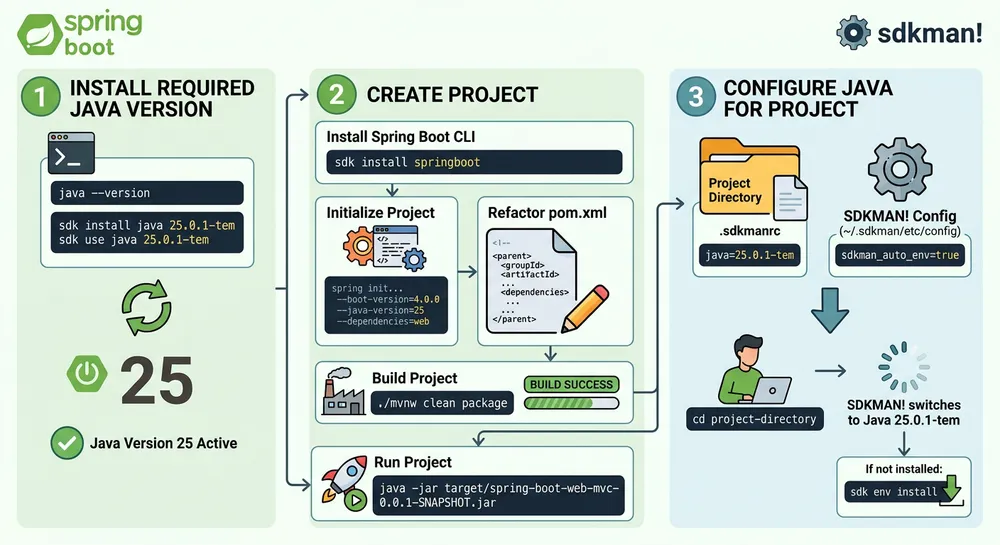
1.Create parent project
Lets create parent project for all lessons’ projects.
We will store all projects in parent directory spring-boot.
mkdir spring-bootcd spring-bootThen, create pom.xml for our parent project
<project xmlns="http://maven.apache.org/POM/4.0.0" xmlns:xsi="http://www.w3.org/2001/XMLSchema-instance" xsi:schemaLocation="http://maven.apache.org/POM/4.0.0 https://maven.apache.org/xsd/maven-4.0.0.xsd"> <!-- The version of the POM format that this project uses --> <modelVersion>4.0.0</modelVersion>
<!-- Unique identifier for the organization or group that created the project --> <groupId>com.romach007</groupId> <!-- Unique base name of the primary artifact being generated by this project --> <artifactId>spring-boot</artifactId> <!-- The current version of the artifact generated by the project --> <version>0.0.1-SNAPSHOT</version> <!-- The type of artifact this project produces. We use pom because we don't want to generate a jar or war file for parent project --> <packaging>pom</packaging>
<!-- Custom properties that can be used by all other projects --> <properties> <java.version>25</java.version> </properties>
<!-- The parent project from which this project inherits configuration --> <parent> <groupId>org.springframework.boot</groupId> <artifactId>spring-boot-starter-parent</artifactId> <version>4.0.0</version> <relativePath/> </parent>
<!-- List of sub-modules that are part of this multi-module project --> <modules> <module>spring-boot-web-mvc</module> <module>rest-api-domain-entities</module> <module>controllers</module> </modules>
<!-- Configuration for the build process --> <build> <plugins> <!-- Plugins used during the build process --> <plugin> <groupId>org.springframework.boot</groupId> <artifactId>spring-boot-maven-plugin</artifactId> </plugin> </plugins> </build></project>2.Install required Java version
Check Java Version
java --versionCheck that the currently installed Java version is 25. If not - install it.
Install and use Java 25
sdk install java 25.0.1-temsdk use java 25.0.1-tem3.Create project
Install Spring Boot CLI
To create a Spring Boot project, we will use the Spring Boot CLI.
sdk install springbootInitialize Project
Use Spring Boot CLI to create a Spring Boot project with Spring Web MVC dependency.
spring init \--boot-version=4.0.0 \--java-version=25 \--build=maven \--groupId=com.romach007 \--artifactId=spring-boot-web-mvc \--name=spring-boot-web-mvc \--package-name=com.romach007.spring_boot_web_mvc \--dependencies=web \spring-boot-web-mvcRefactor `pom.xm` of the project
We should refactor pom.xml of our spring-boot-web-mvc project because we use parent project for specifiing common libraries.
<?xml version="1.0" encoding="UTF-8"?><project xmlns="http://maven.apache.org/POM/4.0.0" xmlns:xsi="http://www.w3.org/2001/XMLSchema-instance" xsi:schemaLocation="http://maven.apache.org/POM/4.0.0 https://maven.apache.org/xsd/maven-4.0.0.xsd"> <modelVersion>4.0.0</modelVersion> <parent> <groupId>com.romach007</groupId> <artifactId>spring-boot</artifactId> <version>0.0.1-SNAPSHOT</version> <relativePath>../pom.xml</relativePath> </parent> <artifactId>spring-boot-web-mvc</artifactId> <name>spring-boot-web-mvc</name> <dependencies> <dependency> <groupId>org.springframework.boot</groupId> <artifactId>spring-boot-starter-webmvc</artifactId> </dependency> </dependencies></project>Build Project
Use Maven Wrapper command to build the Spring Boot project.
./mvnw clean packageRun Project
Use JRE to run the Spring Boot project.
java -jar target/spring-boot-web-mvc-0.0.1-SNAPSHOT.jar4.Configure the Java version for a project
Add a .sdkmanrc file to the project directory:
java=25.0.1-temEnable switching SDK versions in the SDKMAN! config ~/.sdkman/etc/config:
sdkman_auto_env=trueAfter setting up the .sdkmanrc file, SDKMAN! will automatically switch to the required Java version when you cd into the project directory.
If the specified Java version is not installed, SDKMAN! will prompt you to install it.
Run the following command to install it:
sdk env install